Pune Metro Pink Line Ticket Booking: Your Complete Step-by-Step Guide
The Pune Metro Pink Line ticket booking process is your gateway to riding the new route. The wait is finally over. Pune’s Pink Line (Line 3) is set to begin passenger services on November 4, 2026, connecting the IT hub of Hinjawadi to the city centre at Shivajinagar. If you are planning to be one of the first to ride, here is exactly how you can book your ticket, the fares you will pay, and how to get your QR code ready.
If you are planning to be one of the first to ride, here is exactly how you can book your ticket, the fares you will pay, and how to get your QR code ready.
Pune Metro Pink Line Ticket Booking: How Much Will It Cost?
Before you book, it helps to know the fare. The Pink Line uses a distance-based fare system under a public-private partnership model. Fares range from ₹12 for short trips up to ₹62 for the full Maan-Hinjawadi to Shivajinagar journey .
Here is the breakdown based on distance :
- 0–2 km: ₹12
- 2–4 km: ₹25
- 4–8 km: ₹37
- 8–12 km: ₹43
- 12–18 km: ₹49
- 18 km and above: ₹62
Pune Metro Pink Line Ticket Booking: 5 Ways to Book
Pune Metro has rolled out multiple smart ticketing options to ensure you don’t have to wait in long queues .
1. The Official Pune Metro App (Fastest)
This is the most direct digital method.
- Step 1: Download the “Pune Metro” app from the Google Play Store or Apple App Store .
- Step 2: Create an account and select your source (e.g., Hinjawadi) and destination (e.g., Shivajinagar) stations.
- Step 3: Pay using UPI, debit card, or net banking.
- Step 4: A QR code will be generated instantly on your phone. Simply scan this at the entry gate to board .
2. WhatsApp Ticketing (No App Needed)
If you don’t want to download an app, you can use WhatsApp.
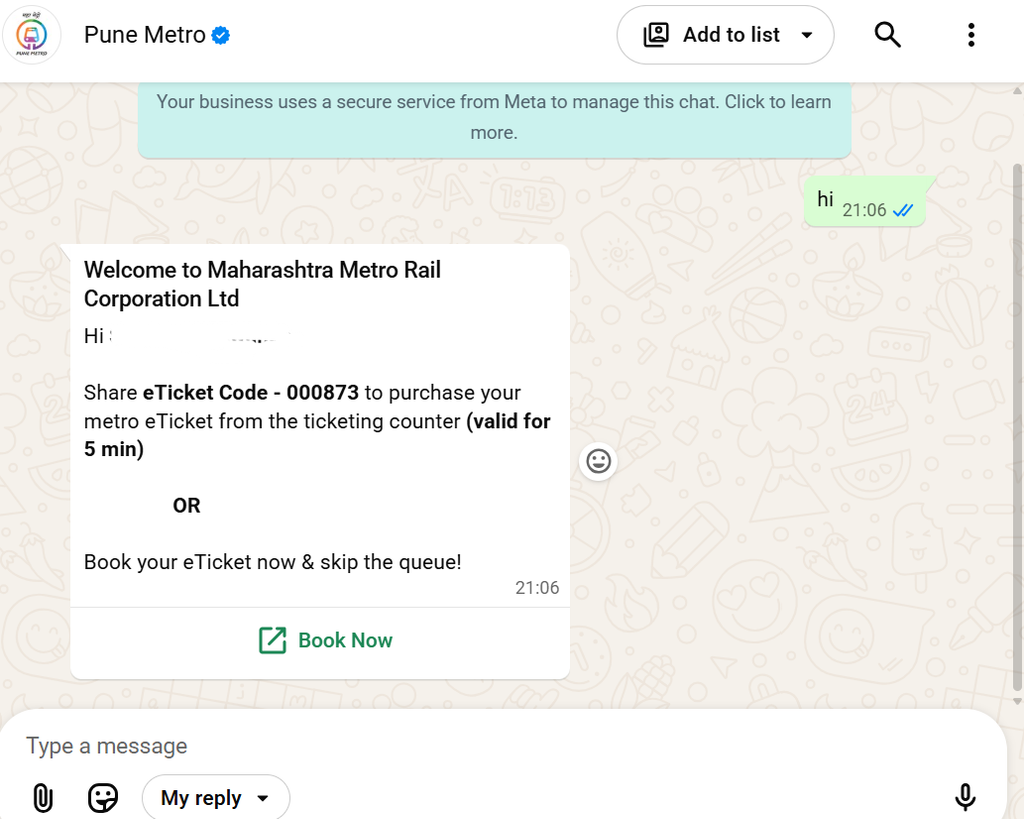
- Step 1: Save Pune Metro’s official WhatsApp number: 9420101990 .
- Step 2: Send a “Hi” message to initiate the chatbot.
- Step 3: Follow the prompts to select your destination and pay.
- Step 4: You will receive a QR code link on WhatsApp. Scan it at the gate .
OR CLICK
Note :(The Pune Metro Pink Line ticket booking links on WhatsApp and third-party apps are still being updated)
3. Paytm (ONDC Integration)
Pune Metro has integrated with Paytm.
- Open the Paytm app, search for “Metro”, select “Pune Metro”, and choose the “Metro QR Ticket” option. Select your stations and pay to get your entry QR code .
4. Ticket Vending Machines (ATVMs)
Available at every station. You can pay using cash, UPI, or cards. The machines will print a paper ticket or send a QR code to your phone .
5. Traditional Ticket Counters
If you prefer speaking to a person, the manual counters at each station accept cash and digital payments
Pune Metro Pink Line Ticket Booking: Timings for November 4
- First Train: Services begin at 6:00 AM .
- Last Train: The last train from Maan towards District Court leaves at 10:30 PM, and from District Court towards Maan at 11:40 PM .
- Frequency: Trains will run every 6 minutes during peak hours and every 12 minutes during off-peak times .
(Note: Only 17 of the 23 stations will be operational from Day 1. Stations like Baner and Shivajinagar are expected to open later in November or December, so check the app before you travel) .
Also read : pune-metro-pink-line-launch-guide
